
Start with the result and its timestamp
A useful result history identifies the table, the event, its settlement time and any final multiplier. Timezone matters: two screens can display different dates for the same instant. Start by aligning those details.
Keep settlement time separate from collection time. A source can publish a completed round later, and a tracker can receive it later still. A clear timeline helps you understand what the screen is showing.
What does “NO … spins” measure?
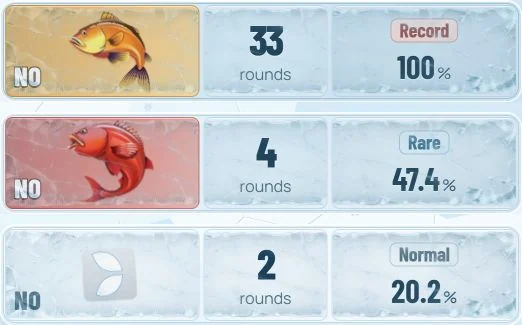
An absence counter measures observed rounds since a particular event last appeared. Each fish or Leaf category has its own counter. The unit is rounds, not minutes; the pace of play can vary.
Exact counters need a continuous record from the relevant anchor. When a history has a gap, a responsible interface keeps the uncertainty attached to the number. Read the counter and its data context together.
Turn a raw interval into context
The same number of rounds can mean different things for different event categories. SpyFishing compares an observed interval with the history it has collected and assigns a rarity grade.
Its published methodology targets a rolling seven-day reference and recalibrates the baseline at midnight UTC. The reference remains fixed during the day while newly settled rounds update the current counters. Record is the name of a rarity grade within that reference.
Read multiplier history with its window
Recent catches show individual resolved multipliers. Observed minimum and maximum summarise the available sample. A 24-hour high adds a clearly bounded lookback. These are useful views of the same history, with different windows.
When comparing two services, align table identity, lookback period, timezone and data coverage before comparing the values. A larger archive and a shorter rolling window can reasonably show different maxima.
A compact overview: the index
SpyFishing combines absence patterns and the recent stream of higher multiplier results into its historical index. It is a way to inspect several aspects of the collected situation in one place. Open the underlying cards when you want to see the details behind it.
Explore an actual recorded session
Our SpyFishing page embeds the complete original assistant interface. Open the cards, inspect catches and switch to History. The recording is drawn from the existing historical service, with its date and playback speed displayed.
Explore SpyFishingSources & further reading
Game-specific facts are checked against the official publications below. Numerical examples are labelled as illustrations.